[wesbos30] 06. 검색 자동완성 기능 구현
![[wesbos30] 06. 검색 자동완성 기능 구현](https://firebasestorage.googleapis.com/v0/b/cruz-lab.firebasestorage.app/o/images%2Fheroes%2Fhero-1764848639126.webp?alt=media&token=37ef07aa-bfc9-43b0-8ddb-9336cf9b6d4b)
💡 javascript를 활용하여 실시간으로 검색정보를 받아오자!
로직
fetch로 json 데이터를 배열에 담기- 입력한 단어가 배열 안에 있는지 비교해서 찾는 함수 생성
- 일치하는 결과를 보여주는 함수 생성
코딩 과정
1. json 데이터 배열에 담기
const endpoint =
  'https://gist.githubusercontent.com/Miserlou/c5cd8364bf9b2420bb29/raw/2bf258763cdddd704f8ffd3ea9a3e81d25e2c6f6/cities.json'

const cities = []
fetch(endpoint)
  .then(res => res.json())
  .then(data => cities.push(...data))
json 파일
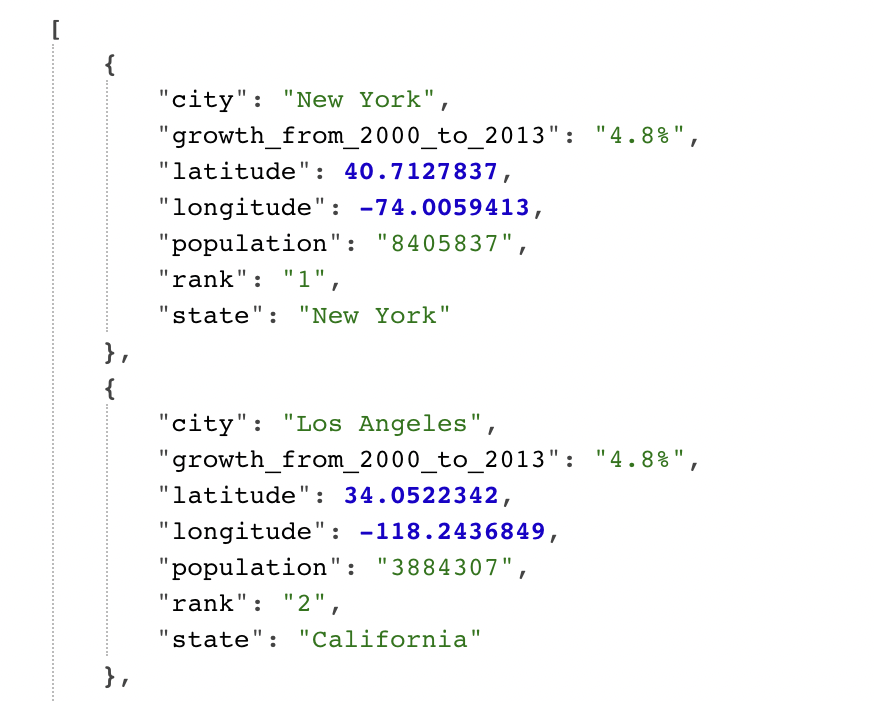
fetch
fetch()는 자바스크립트에서 서버에 네트워크 요청을 보내고 새로운 정보를 받아올 수 있도록 도와주는 메서드이다.
fetch(url, [options])

/* options에는 선택 매개변수, method나 header 등을 지정할 수 있으며,
options에 아무것도 넘기지 않으면 요청은 GET 메서드로 진행되어 url로부터 파일이 다운로드된다. */
fetch() 메서드는 HTTP response 객체를 래핑한 Promise 객체를 반환하고,
요청이 완료되면 Promise가 resolved 되어 response 객체가 반환된다.
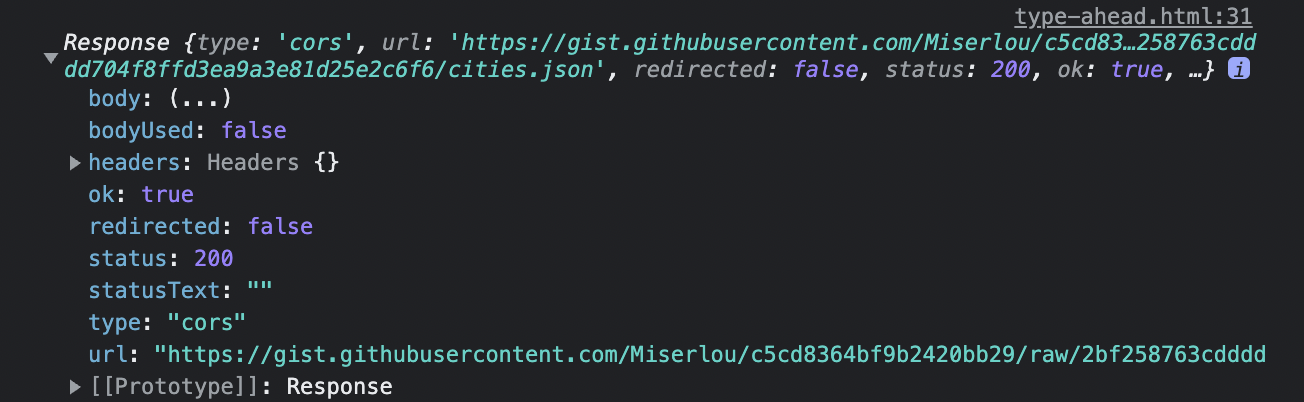
response 객체를 반환받는데 성공했으면..
⇒ 후속 처리 메서드인 then()과
response 객체로부터 JSON 형태의 데이터를 자바스크립트 객체로 변환해주는 메서드인 json()를 사용하여 json 데이터를 얻은 후
⇒ 그 데이터를 배열에 담아준다.
2. 배열 안에서 단어 찾기
function findMatches(wordToMatch, cities) {
  return cities.filter(place => {
    const regex = new RegExp(wordToMatch, 'gi')
    return place.city.match(regex) || place.state.match(regex)
  })
}
정규 표현식 RegExp
RegExp 생성자 함수를 호출하여 정규식을 만들 수 있다.
const regexp = new RegExp(표현식, [플래그])
플래그는 표현식의 옵션으로 표현식으로 검색하려는 문자 패턴에 추가적인 옵션을 넣어 원하는 문자 검색 결과를 반환하도록 할 수 있다.
-
g(Global): 문자열 전체를 확인하여 일치하는 모든 검색 결과를 반환한다. (g 플래그가 없으면 맨 처음 일치 결과만 반환)
-
i(Ignore case): 문자열에서 대소문자를 구분하지 않는다.
-
m: 주어진 문자열에 줄바꿈이 있을 경우, 여러 줄로 취급하여 검사한다.
-
s: 문자열에서 임의의 한 문자를 가리키는 메타 문자인
.에 개행문자(\n)도 포함시키도록 한다. 즉,.이 줄바꿈도 임의의 한 문자로 취급하여 검색한다. -
y: 대상 문자열의 현재 위치부터 비교를 시작하도록 설정한다.
-
u: 유니코드 전체를 지원한다.
String.match(regexp)
match()메서드는 문자열이 정규식과 매치되는 부분을 검색하여 배열로 반환한다.
3. 일치하는 결과 나타내기
function displayMatches() {
  const matchArray = findMatches(this.value, cities)
  const html = matchArray
    .map(place => {
      const regex = new RegExp(this.value, 'gi')
      const cityName = place.city.replace(
        regex,
        `<span class="hl">${this.value}</span>`,
      )
      const stateName = place.state.replace(
        regex,
        `<span class="hl">${this.value}</span>`,
      )
      return `
			<li>
				<span class="name">${cityName}, ${stateName}</span>
				<span class="population">${numberWithCommas(place.population)}</span>
			</li>
		`
    })
    .join('')
  suggestions.innerHTML = html
}

function numberWithCommas(x) {
  return x.toString().replace(/\B(?=(\d{3})+(?!\d))/g, ',')
}
최종코드
const endpoint =
  'https://gist.githubusercontent.com/Miserlou/c5cd8364bf9b2420bb29/raw/2bf258763cdddd704f8ffd3ea9a3e81d25e2c6f6/cities.json'

const cities = []

fetch(endpoint)
  .then(res => res.json())
  .then(data => cities.push(...data))

/* then 대신 async await를 이용한 방식
const getData = async () => {
  const a = await fetch(endpoint)
  const json = await (
    await fetch(endpoint)
  ).json();
  cities.push(...json)
}
getData()
*/

function findMatches(wordToMatch, cities) {
  return cities.filter(place => {
    // here we need to figure out if the city or state matches what was searched
    const regex = new RegExp(wordToMatch, 'gi')
    return place.city.match(regex) || place.state.match(regex)
  })
}

function numberWithCommas(x) {
  return x.toString().replace(/\B(?=(\d{3})+(?!\d))/g, ',')
}

function displayMatches() {
  const matchArray = findMatches(this.value, cities)
  const html = matchArray
    .map(place => {
      const regex = new RegExp(this.value, 'gi')
      const cityName = place.city.replace(
        regex,
        `<span class="hl">${this.value}</span>`,
      )
      const stateName = place.state.replace(
        regex,
        `<span class="hl">${this.value}</span>`,
      )
      return `
      <li>
        <span class="name">${cityName}, ${stateName}</span>
        <span class="population">${numberWithCommas(place.population)}</span>
      </li>
    `
    })
    .join('')
  suggestions.innerHTML = html
}

const searchInput = document.querySelector('.search')
const suggestions = document.querySelector('.suggestions')

searchInput.addEventListener('change', displayMatches)
searchInput.addEventListener('keyup', displayMatches)